Removing published posts from a website

Brief description
If you need specific published posts removed from your website, this can be done by deleting the posts or changing their status so they are no longer publicly accessible. This is commonly used to take down outdated job adverts, announcements, or other time-sensitive content.
Purpose
- Individual post URLs remain live on the website and can still be viewed by visitors but the content is no longer needed.
- Specific published posts that need to be removed from public view to make edits.
Solution
- Identify the exact post URLs or titles that need to be removed.
- Open the website’s content management system and locate each post in the posts list.
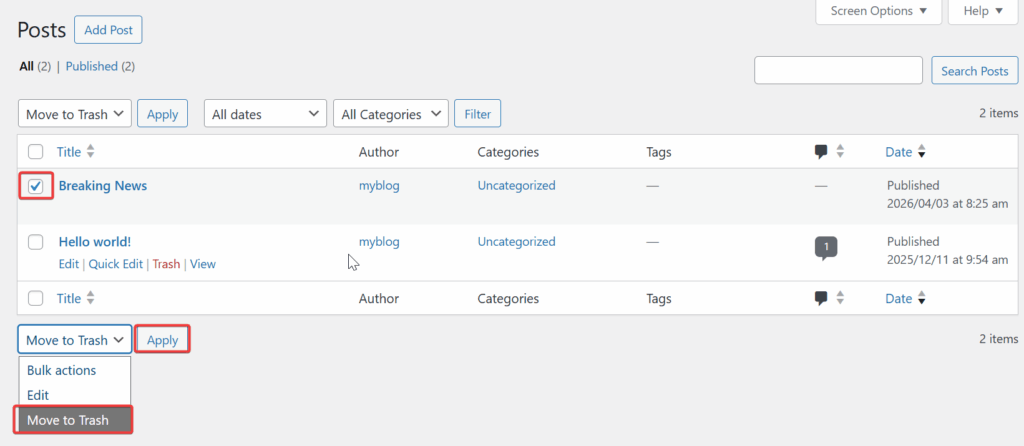
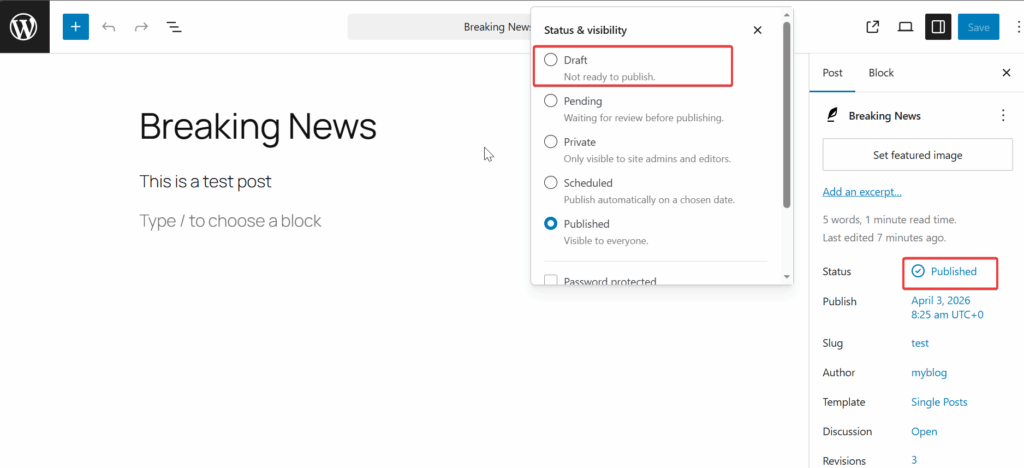
- Remove the posts by either deleting them or changing their status from published to a non-public state, depending on whether they may be needed again later.
- Check each affected URL afterwards to confirm the posts are no longer available to the public.
- If you cannot access the content management system or do not have permission to make the change, contact support via cloudabove.com/contact-us and provide the affected post URLs.
Once completed, the specified posts should no longer be visible on the website.
Example of changing the post status from Publish to Draft
Example of Deleting Post