Change PHP’s maximum execution time limit

PHP has a set limit for the amount of time it will allow scripts/processes to run and in some cases you may exceed this time limit, for example when uploading large files or running complex PHP scripts etc. However this can be easily adjusted like many other PHP settings/limits.
1. Login to your cPanel account. When you first set up an account with us, you would have received an email with the details on how you can gain access to your control panel. If you have lost those details, feel free to raise a support ticket or call in.
2. Navigate to Select PHP Version.

3. Click on the Options tab to view the PHP settings.

4. The setting we’re looking for is max_execution_time. To change the limit, change the number in the text box to the right of the setting, it will then automatically save the new number once you click outside of the text box.
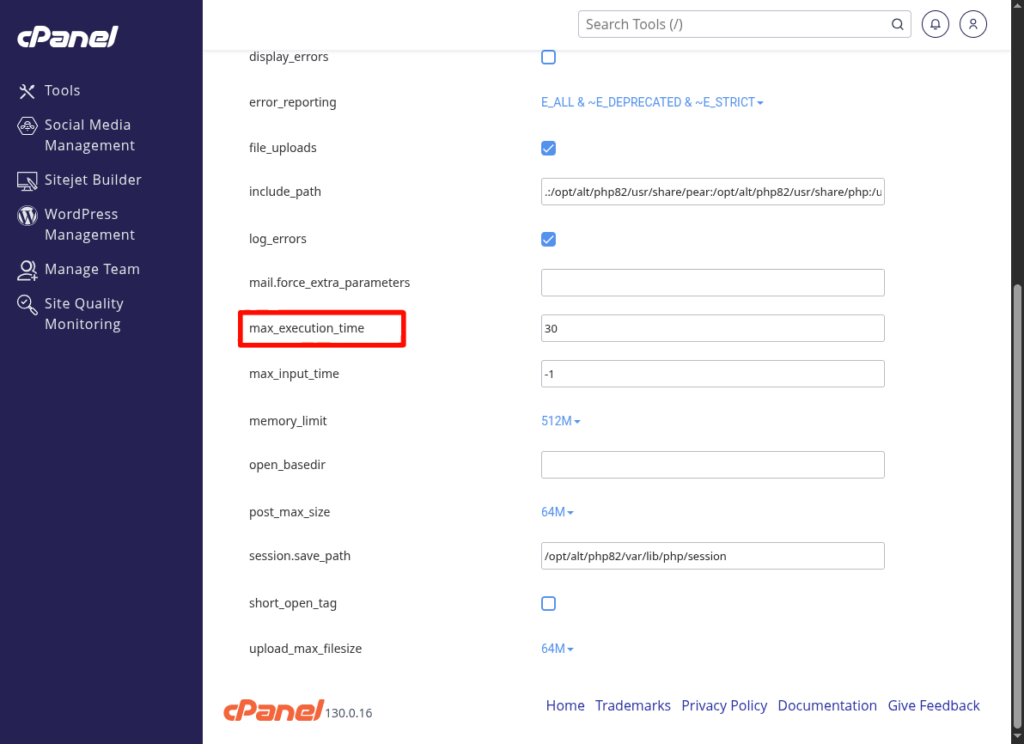
5. That’s it, you’ve successfully changed the max execution time limit.
If you are running into any issues or have any further questions or concerns, please don’t hesitate to get in touch.