Resetting your email password

This guide will show you how to change an email password using cPanel.
1. Login to your cPanel account. When you first set up an account with us, you would have received an email with the details on how you can gain access to your control panel. If you have lost those details, please get in touch.
You can also access your cPanel account via your cloudabove.com customer portal. Please see the following guide on how to do this: https://cloudabove.com/help/how-to-login-to-cpanel/
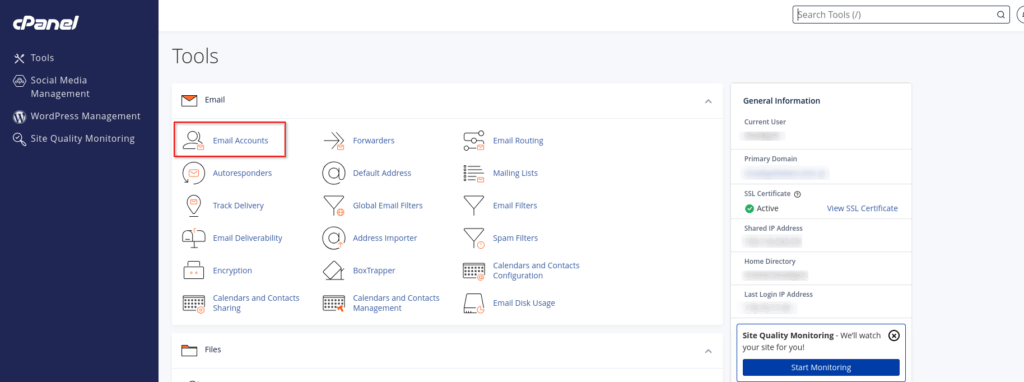
2. Now that you are logged into your cPanel account, navigate to “Email Accounts”
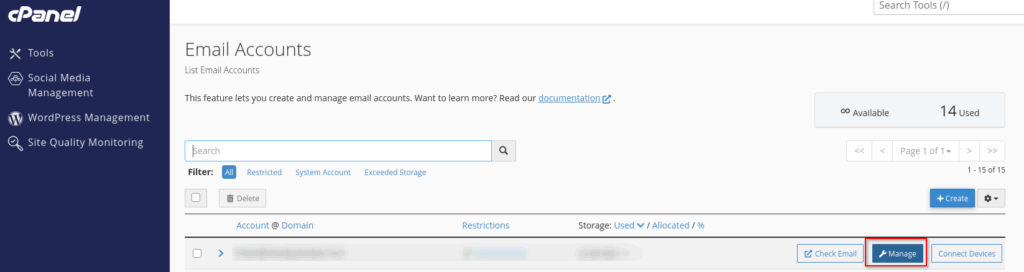
3. Click the option to “Manage” your email address in question.
4. You will now be able to enter a new password for the given mailbox. Scroll towards the bottom of the page to save your changes by clicking “Update Email Settings”.