Pointing a third-party domain to cloudabove hosting and allow SSL to provision

Description
If your domain is registered with another provider and you want cloudabove to host both the website and email for that domain, the simplest setup is to point the domain to your hosting account using the cloudabove nameservers. Once the domain is pointing correctly, the SSL certificate is usually installed automatically.
Reasons
- You want to manage website hosting and email hosting for a domain that is registered with a third-party registrar.
- You have a shared or reseller hosting account and are unsure whether changing the domain’s nameservers would connect it to your website.
- After pointing the domain, the website briefly shows a browser security warning or appear as not secure while SSL is still being issued.
- The SSL certificate did not appear immediately on a newly added domain, even when the domain has been configured correctly.
Solution
- At your domain registrar, update the domain to use the cloudabove hosting nameservers provided for your account.
- Save the nameserver changes and allow time for DNS propagation. Usually within 24-48hrs
- Confirm that the domain resolves to your hosting account IP via DNS Checker. Once confirmed, website and email services can be managed through cloudabove.
- The SSL certificate should automatically be provisioned once the platform detects the new domain resolves to the server.
- If the site still shows as not secure after propagation has completed, check the certificate status in your hosting control panel or contact support via cloudabove.com/contact-us so the SSL can be reviewed or installed manually by clicking on RUN AutoSSL.
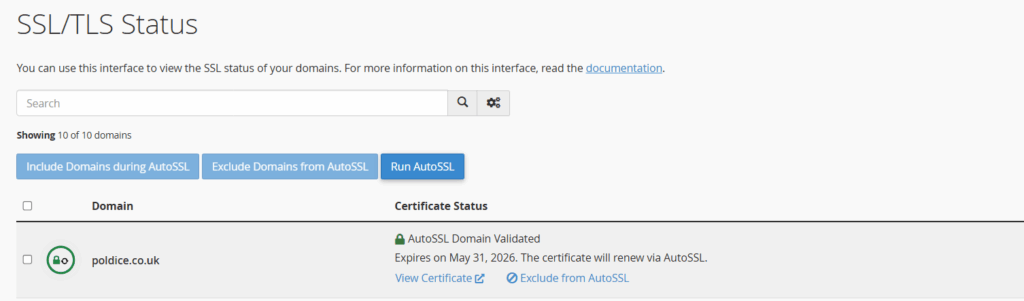
If everything has propagated correctly, the security warning should clear without any further changes once the SSL certificate has been issued and applied.