Website malware & what to do next

If you’ve found malware or suspect your site has been infected, we’re here to help.
How to know if your site is infected with malware
Most infected sites may have the following symptoms:
- Randomly redirecting to third-party sites
- Suspicious content changes (e.g. defacement, new pages, unrelated content)
- Unrecognised admin-level users in your dashboard
- Unrecognised WordPress plugins
- Spam complaints
- A visitor’s anti-virus software or browser warns them about the site
If your site is doing something unusual, or you’ve noticed changes that were not made by you, then it could be malware.
How is a site infected?
In most cases, a website is infected with malware when it’s out of date. For example, you may have a WordPress site that has fallen behind on routine updates and one of those missing updates addressed a security issue that has left your site vulnerable to attack.
In other cases, it’s often due to a weak or compromised password. If you reuse passwords, or have a weak password, it may have been guessed or obtained through a security breach elsewhere.
What about your hosting security?
We believe that protecting your site(s) is part of the service that we’re providing and that’s why all of our hosting services are covered by numerous levels of security as standard.
Our preferred security solutions are Imunify360 and Monarx, both are industry leaders and block thousands of attacks per day.
However, no security solution can guarantee complete protection and if you have an out of date site or a weak password, then it’s typically only a matter of time before your site is compromised.
What happens next?
We recommend the following process for most situations:
- Check your hosting’s anti-malware to confirm your site is infected
- Put your site into maintenance (optional but recommended)
- Identify when the infection occurred
- Restore from a backup or clean your site
- Run through our post-hack process
- Bring your site back online
We understand that anything security related can be worrying and we’re here to help you through the above process
Checking your hosting’s security history or anti-malware
If you’re on a cPanel or Plesk based hosting plan, login to cPanel/Plesk and head to Imunify360 and then History.
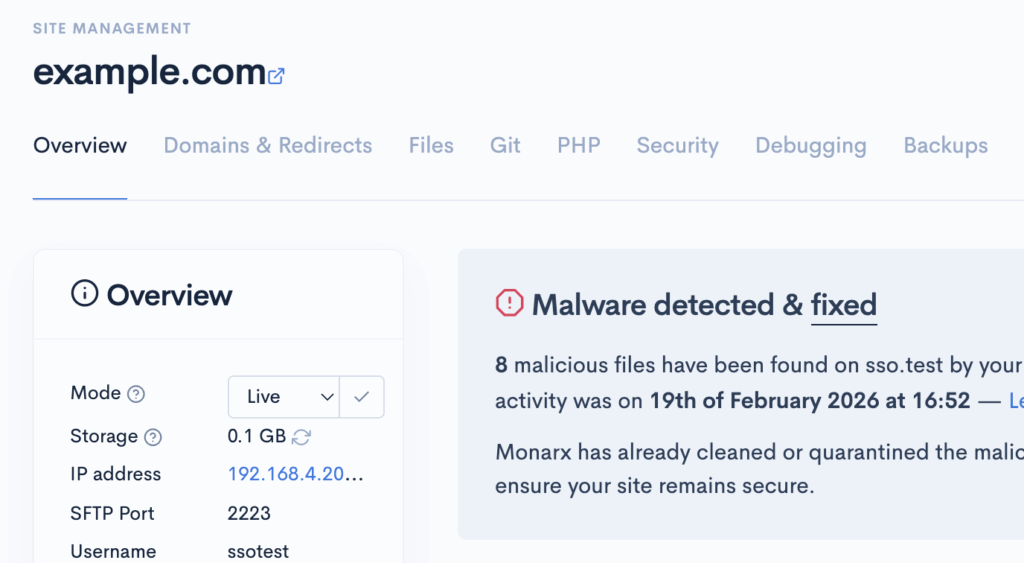
Otherwise, if you’re on a Scout based service, you may have received an email to let you know that malware has been found, or the site shows a notice such as:
Identifying when your site was infected
If you have a rough date/time of when the site was infected, it’s easier to identify how it happened and what backups will be suitable for recovery.
However, it’s not always possible to know exactly when a security issue occurred, but often the best place to start is to look at the date of oldest malware hit.
If Imunify360 or Monarx are not showing any results, then look for other dates/times (e.g. when a user registered, or a file or page was created).
Cleaning or recovering your site
There are multiple options for getting back online:
- Roll back using a backup – all of our services have daily backups and these can be used to quickly recover
- Manual clean – only recommended for small infections or if you have a background in development or security
- Professional audit & clean through cloudabove or a third-party – chargeable but thorough
Using a backup
Backups are the safest way to recover from an infection, but this may not be feasible if you’ve made a lot of content changes or your site is ecommerce based.
Manually cleaning your site
Imunify360 or Monarx may have already quarantined or cleaned the infection for you automatically. If your site is otherwise working and doesn’t contain any unwanted content, you can proceed through to our post-hack steps to help secure your site.
If the malware is still active (i.e. your site is still doing something unusual), then it may be possible to clean your site manually. Whilst we’re not developers, we can help you with this process, but we may refer you to a developer or recommend a professional clean if the infection is deeper than expected.
Professional audit & clean
If backups are not suitable, the site is heavily infected or you simply want peace of mind that the site is definitely clean, then we recommend a professional audit and clean by a security company.
We can provide professional cleans through our security partner Monarx, simply contact us to request a clean. Alternatively, research online or ask your developer for a recommendation.
Post-hack steps
Once your site has been recovered, you’ll want to follow our post-hack steps as soon as possible to prevent your site being reinfected:
- Resetting all website admin user passwords
- Checking for any unrecognised admin users and removing them
- Checking for any unrecognised plugins, extensions or themes & removing them
- Removing any deactivated/redundant themes and plugins (these can still be used to compromise the site)
- Bringing the site’s core, themes and plugins/extensions fully up to date
- Setup two-factor authentication (if available)